Jabra Cruiser – страница 3
Инструкция к Беспроводной гарнитуре и прочей аксессуарам Jabra Cruiser
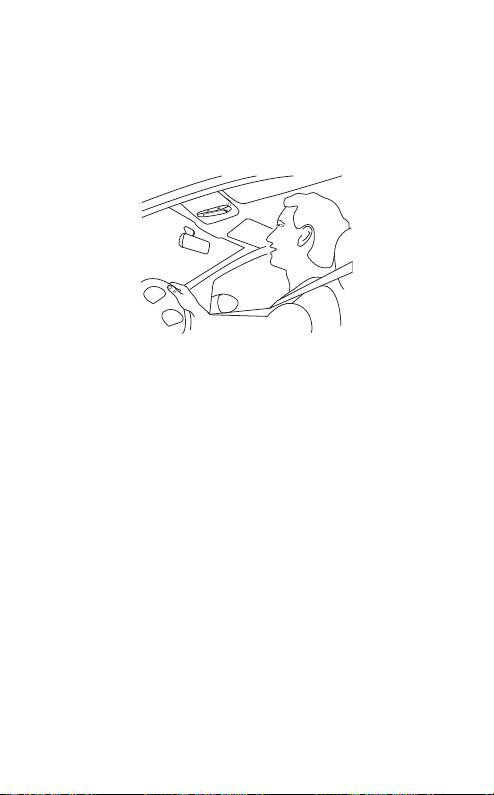
PLACe tHe sPeAKeRPHone In YoUR VeHICLe
The Jabra CRUISER sits discreetly and conveniently on the sun
visor using the attached clip. For optimal sound quality place
the Jabra CRUISER right in front of you and speak directly into
the speakerphone.
english
HoW to
Answer a call
- Tap the answer/end button on your speakerphone to answer
a call.
End a call
- Tap the answer/end button on your speakerphone to end an
active call.
Make a call
- The call will automatically transfer to your speakerphone*.
If not tap the answer/end button.
Reject a call*
- Press the answer/end button.
Activate voice dialing*
- Press the answer/end button. For best results, record the voice-
dialing tag through your speakerphone.
Redial last number*
- Double tap the answer/end button when the speakerphone is
on and not used.
JABRA CRUISER
7
* Phone dependent

Mute/un-mute
- Press volume down button to mute an ongiong call. The mute
beep tone will be heard every 5 seconds.
- Tap the volume up or volume down button to un-mute.
(In FM mode press instead of tap to un-mute).
Adjust sound and volume
- Tap the volume up or volume down button to adjust the
english
volume level. (In FM mode you are not able to adjust volume
via Jabra CRUISER – use your car stereo).
Third party calling*
- This lets you put a call on hold during a conversation and
answer a waiting call.
- Press the answer/end button once to put the active call on hold
and answer the waiting call.
- Press the answer/end button to switch between the two calls.
- Tap the answer/end button to end the active conversation.
Transfer call
- Press and hold answer/end button until you hear a beep to
transfer a call from the speakerphone to the mobile phone.
- Press and hold answer/end button until you hear a beep to
transfer a call from the mobile phone to the speakerphone.
Play or pause music*
- Tap the play/pause/stop button to play or pause music.
Stop music*
- Press the play/pause/stop button.
Change between music tracks*
- Tap next track or previous track button.
Night Driving Mode
- Press FM and volume up button simultaneously when the
speakerphone is on. The light will then turn off. You can turn
the lights back on with another press. The speakerphone will
always turn on with the lights turned on.
JABRA CRUISER
8
* Phone dependent

WHAt tHe LIGHts MeAn
LED Indicator Speakerphone Status
Connection Status Icon ashes
Pairing mode
rapidly
Connection Status Icon solid blue Connected
english
Connection Status Icon ashes
Standby/ Idle
every 2 seconds
Call Status Icon ashes every
Incoming call
1 second
Call Status Icon solid blue Active call
FM Status Icon solid red FM mode
FM Status Icon ashes every
Frequency scanning
1 second
Call Status Icon and Connection
Language selection
Status Icon ashes
Battery Status Icon on (red) Low battery
ADDItIonAL FeAtURes
USING YOUR JABRA CRUISER WITH TWO MOBILE DEVICES
The Jabra CRUISER is capable of having two mobile phones
(or other Bluetooth devices) connected to the speakerphone at
the same time. This will give you the freedom of having only one
speakerphone to operate both of your mobile phones. Please
note that Last Number Redial will dial the number from the last
outgoing call independent of the mobile phone.
If the speakerphone is connected to two phones please note that
Play / Pause / Stop and Next / Previous track will be sent to the
phone that was the last connected phone (Last connected AVRC
prole).
JABRA CRUISER
9

PLAY MUSIC
Make sure that the speakerphone and mobile phone are connected.
When you play music from your mobile phone it will automatically
transfer to your speakerphone. If your phone does not allow this
feature, press the Answer/En button to transfer the music to the
speakerphone. Music will automatically be paused when you have
an incoming call. When the call is ended it will start playing again.
Remote control your music via the music buttons.
english
CHANGE VOICE ANNOUNCEMENT LANGUAGE
Voice announcements give you a more convenient and safe use of
Jabra CRUISER. There are 5 supported languages in the following
order:
1 English
2 Spanish
3 German
4 French
5 Russian
Additional languages
Italian, Portuguese, Chinese can be downloaded via a separate
software version found on www.jabra.com.
Default language is English. To change language follow these steps:
- Enter pairing mode by press and hold Answer/End button
when Jabra CRUISER is on until voice announces: “Pairing mode”
- Press FM button until current language is announced.
- Tap Volume Up or Volume Down button to select a new
language.
- Select preferred language and press FM button until the new
language is announced.
JABRA CRUISER
10

Note: It is possible to turn o the voice announcement function.
When tapping the Volume Up or Volume Down buttons to
select the desired language, the beep tone indicates the voice
announcement function is o. When beep tone is heard press FM
button and the voice announcement function will be o.
USING THE FM TRANSMITTER
The FM transmitter in the speakerphone allows you to transmit
english
calls and music from your mobile to the car stereo when the
speakerphone and car radio are set to the same frequency.
- Connect your mobile phone and speakerphone.
- Press FM button to enter FM mode. The FM Status Icon will turn
solid red and a FM frequency will be announced.
- Manually turn your radio into the same FM frequency and you
are now ready to transmit calls or music from your phone to
your car stereo.
- The FM transmitter will automatically turn off after 10 minutes
if the function is not used.
Note: The visor clip works as the FM antenna. The FM transmitter
will not work if the visor clip is removed.
CHANGING FM FREQUENCY
When you enter FM mode the speakerphone will always transmit
calls and music on the latest used FM frequency. For the FM
transmitter to work well, a free radio frequency must be found.
A free radio frequency is one that no commercial and public radio
station is broadcasting on. As you drive and change environment
the FM audio quality could potentially be reduced due to frequency
interferences. If sound performance is unsatisfactory it is possible
to select a new FM frequency.
- Enter FM mode.
- Press Volume up button until “Searching” is announced.
- When a new frequency is found and announced, tune your
radio manually into the same FM frequency. The speakerphone
will automatically save the new frequency.
A tap on the Volume up/Volume down button will change the
frequency on your speakerphone by 0.1 MHz allowing you to ne
tune the signal.
JABRA CRUISER
11

USING THE FM TRANSMITTER WHEN VOICE ANNOUNCEMENT
FUNCTION IS OFF
If voice announcement function is turned o you can select any of
the pre-programmed frequency channels in the following order:
LED indication
(FM Frequency selection mode)
Pre-pro-
Chan-
english
grammed
Blue-
nel No
Battery
Call
FM
Frequency
tooth
status
status
status
status
1 88.1 MHz O O On
2 88.3 MHz O On O
3 88.5 MHz On O O
4 88.7 MHz O On On
Flash
5 88.9 MHz On O On
6 89.1 MHz On On O
7 89.3 MHz On On On
To select the desired FM frequency channel, follow these steps:
- Connect your mobile phone and speakerphone.
- Press FM button to enter FM mode. The default frequency
channel is 88.1MHz
- Press the Volume Up or Volume Down button to move to the
next/previous channel.
- Manually turn your radio into the same FM frequency and you
are now ready to transmit calls or music from your phone to
your car stereo.
Note 1: While changing frequencies the FM Status Icon ashes
every 1 second.
Note 2: While changing frequencies, a repeated beep-tone will be
heard and frequencies can be recognized by the combinations of
Status Indicators. (See the table above.)
JABRA CRUISER
12

CALLER ID
During an incoming call Jabra CRUISER will access the phone book
in the mobile phone and announce the name of the caller. If your
phone does not support phonebook access prole (PBAP) it will
announce the number of the caller.
SOFTWARE UPGRADE
english
It is possible to upgrade the speakerphone software.
Go to www.jabra.com and follow the instructions.
tRoUBLesHootInG & FAQ
I hear crackling noises
- Bluetooth is a radio technology, which means it is sensitive to
objects between the speakerphone and the connected device.
It is designed for the speakerphone and the connected device
to be used within 33 feet (10 meters) of each other, with no
major objects in the way (walls, etc.).
I cannot hear anything in my speakerphone
- Increase the volume in the speakerphone.
-
Ensure that the speakerphone is paired to a device that is playing.
- Make sure your phone is connected to the speakerphone by
tapping the Answer/End button.
I am having pairing problems
- You may have deleted your speakerphone pairing connection
in your mobile phone. Follow the pairing instructions.
I want to reset the pairing list in my speakerphone
The speakerphone registers a list of up to 7 mobile phones.
To remove the list, press and hold the Answer/End button, Volume
up button and FM button at the same time. A beep indicates the
list was removed from the speakerphone memory. The next time
you power on, the speakerphone will go into pairing mode as the
rst time you powered your new Jabra CRUISER on.
JABRA CRUISER
13

Will the Jabra CRUISER work with other Bluetooth equipment?
- The Jabra CRUISER is designed to work with Bluetooth mobile
phones. It can also work with other Bluetooth devices that are
compliant with Bluetooth version 1.1 or higher and support
a headset, hands-free and/or advance audio distribution profile.
I cannot use Reject call, call on hold, Redial or voice dialing
These features are dependent on the ability of your phone to
english
support a hands-free prole. Even if the handsfree prole is
implemented reject call, call hold and voice dialing are optional
features which are not supported by all devices. Please consult
your device manual for details.
Please note that some features can only be operated from the
primary device e.g. voice dial using Jabra CRUISER with 2 mobile
phones.
I can not connect speakerphone and radio via FM transmitter
- Make sure the radio is turned on and speakerphone is in FM
mode (FM Status Icon is on).
- If your radio when searching is not able to find the FM frequency
set by your speakerphone, the FM frequency must be tuned
in manually on the radio. Please read radio manual to find out
how to manually change frequency on your radio.
- If your radio is in TA (Traffic Announcement) mode, switch TA
off and your radio should be able to find your speakerphone
when using the search function on the radio. If not tune in
manually.
- The sensitivity of the search function on your radio determines
whether it is able to find the frequency set by your speakerphone.
On some radios you are able to adjust the sensitivity thus
making it possible to find the speakerphone frequency when
searching. If not tune in manually.
- In urban areas it might be difficult to find a clear frequency.
It is therefore advisable to use a frequency in the lower or upper
end of the FM frequency band (e.g. 88.1 or 107.7 MHz) where
you will have the best chance to find a clear frequency.
JABRA CRUISER
14

neeD MoRe HeLP?
1. Web: http://www.jabra.com
(for the latest support info and online User Manuals)
2. E-mail:
Australia support.au@jabra.com
China support.cn@jabra.com
english
Japan support.jp@jabra.com
Singapore support.sg@jabra.com
Information: info@jabra.com
3. Phone:
Australia 1-800-738-521
China 800-858-0789
Japan 03-3242-8722
Singapore 800-101-2329
tAKInG CARe oF YoUR sPeAKeRPHone
- Always store the Jabra CRUISER with the power o and safely
protected.
- Avoid storage at extreme temperatures (above 45°C/113°F –
including direct sunlight – or below -10°C/14°F). This
can shorten battery life and may aect operation. High
temperatures may also degrade performance.
- Do not expose the Jabra CRUISER to rain or other liquids.
JABRA CRUISER
15

GLossARY
1. Bluetooth is a radio technology that connects devices, such
as mobile phones and headsets, without wires or cords over
a short distance (approx. 10 meters/33 feet). Bluetooth is safe
to use. It is secure too, so once a connection has been made
no-one can listen in and there is no interference from other
Bluetooth devices either. Get more information at
english
www.bluetooth.com.
2. Bluetooth proles are the dierent ways that Bluetooth
devices communicate with other devices. Bluetooth phones
support the headset prole, the hands-free prole or both.
In order to support a certain prole, a phone manufacturer
must implement certain mandatory features within the phone’s
software.
3. Pairing creates a unique and encrypted link between two
Bluetooth devices and lets them communicate with each other.
Bluetooth devices will not work if the devices have not been
paired.
4. Passkey or PIN is a code that you enter on your Bluetooth
enabled device (e.g. a mobile phone) to pair it with your
Jabra CRUISER. This makes your device and the Jabra CRUISER
recognize each other and automatically work together.
5. Standby mode is when the Jabra CRUISER is passively
waiting for a call. When you ‘end’ a call on your mobile phone,
the speakerphone goes into standby mode.
Dispose of the product according
to local standards and regulations.
www.jabra.com/weee
JABRA CRUISER
16

Indholdsfortegnelse
TAK ............................................................2
OM DIN JABRA CRUISER ........................................2
DET KAN DIN SPEAKERPHONE..................................3
KOM GODT I GANG.............................................4
EngElsk
OPLAD DIN SPEAKERPHONE ...................................4
TÆND/SLUK FOR DIN SPEAKERPHONE..........................5
PARRING MED DIN TELEFONEN .................................5
OPRETTELSE AF FORBINDELSE TIL DIN TELEFON .................6
PLACERING AF DIN SPEAKERPHONE I DIN BIL...................7
SÅDAN GØR DU ................................................7
HVAD BETYDER LYSINDIKATORERNE . . . . . . . . . . . . . . . . . . . . . . . . . . . . 9
EKSTRA FUNKTIONER ...........................................9
FEJLFINDING OG OFTE STILLEDE SPØRGSMÅL..................13
BRUG FOR MERE HJÆLP?......................................15
PLEJE AF DIN HØJTALERTELEFON .............................16
ORDLISTE .....................................................16
JABRA CRUISER
1
tAK
Tak, fordi du købte Jabra CRUISER Bluetooth®-din speakerphone.
Vi håber, du får fornøjelse af den. Denne brugervejledning vil få
dig i gang og i stand til at få det meste ud af din Speakerphone.
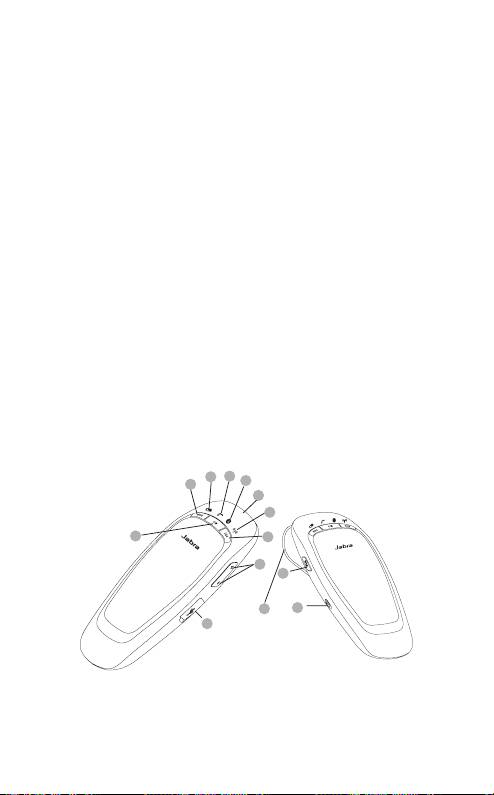
oM dIn JABrA CrUIser
EngElsk
1) Besvar/afslut-knap
2) FM-knap
3) Lydstyrke op/lydstyrke ned-knap
4) Opladerstik
5) Tænd/sluk-knap
6) Afspil/pause/stop-knap
7) Næste nummer
8) Forrige nummer
9) Ikon for batteristatus
10) Ikon for opkaldsstatus
11) Ikon for forbindelsesstatus
12) Ikon for FM-status
13) Solskærmsclips
9
10
11
8
1
12
6
7
3
2
13
5
4
JABRA CRUISER
2

det KAn dIn speAKerphone
Med Jabra CRUISER kan du:
- Besvare opkald
- Afslutte opkald
- Afvise opkald*
- Foretage stemmeopkald*
EngElsk
- Foretage genopkald til det sidst kaldte nummer*
- Slå mikrofonen fra
- Tredjeparts-opkald*
- Overføre opkald
- Aktivere tilstanden natkørsel
- Justere lydstyrken
- Overføre og fjernbetjene musik på mobiltelefonen
- Overføre opkald eller musik til din bilradio via FM-sender
- Anvende MultiUse™ – dvs. forbinde to Bluetooth-enheder
samtidigt
Specifikationer
- Op til 14 timers taletid og 300 timers standby-tid
- Støjfjernende teknologi med to mikrofoner for bedre lyd
- Digital lydforbedring via DSP-teknologi
- Talte meddelelser™
- A2DP (Advanced Audio Distribution Profile) til streaming af musik*
- AVRCP (Audio/Video Remote Control Profile) til fjernbetjening
af musik*
- FM-sender
- Jabra status-visning – status for batteri, opkald, forbindelse og FM
- Størrelse: L 127 mm x B 62 mm x H 17 mm
- Vægt 85 g
- Rækkevidde på op til 10 meter
- Understøttede Bluetooth-profiler: HFP, HSP, A2DP, AVRCP, PBAP
- Bluetooth-specifikation (se ordliste) version 2.1 + EDR
- e-SCO for bedre lydkvalitet
- Genopladeligt batteri med opladningsmuligheder fra biloplader
eller via USB-kabel
JABRA CRUISER
3
* Afhænger af telefonen
KoM godt I gAng
Du skal udføre tre trin, før du tager din speakerphone i brug:
1 Oplad din speakerphone
2 Aktiver Bluetooth på din mobiltelefon (se vejledningen til
mobiltelefonen)
3 Par din speakerphone med mobiltelefonen
EngElsk
Jabra CRUISER er nem at betjene. Knappen Besvar/afslut på
din speakerphone udfører forskellige funktioner, afhængigt
af hvor længe du trykker på den.
Instruktion Trykkets varighed
Bank Tryk let
Dobbeltbank 2 hurtigt gentagne bank
Tryk Ca. 1 sekund
Tryk og hold nede Ca. 5 sekunder
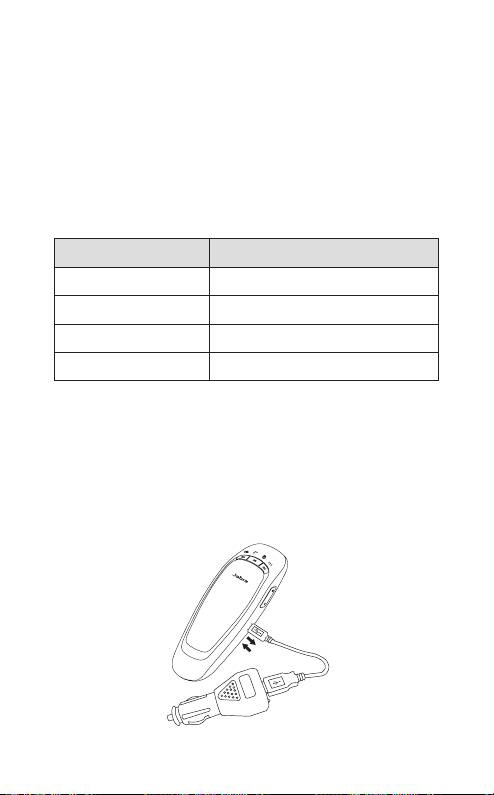
oplAd dIn speAKerphone
Sørg for, at din speakerphone oplades i to timer, før du begynder
at bruge den. Tilslut Jabra CRUISER til bilopladeren med USB-kablet.
Sæt bilopladerstikket i bilens strømudtag. Ikonet for batteristatus
lyser rødt under opladning. Når den er ladet fuldt op, lyser ikonet
for batteristatus grønt. Jabra CRUISER kan lades op uden for bilen
ved hjælp af USB-kablet.
JABRA CRUISER
4
Brug kun den oplader, der følger med din speakerphone.
Undgå at bruge opladere fra andre enheder, da det kan
beskadige din speakerphone.
Bemærk: Batteriets levetid nedsættes betragteligt, hvis der går
lang tid, hvor du ikke oplader din enhed. Derfor anbefaler vi,
at du genoplader din enhed mindst én gang om måneden.
EngElsk
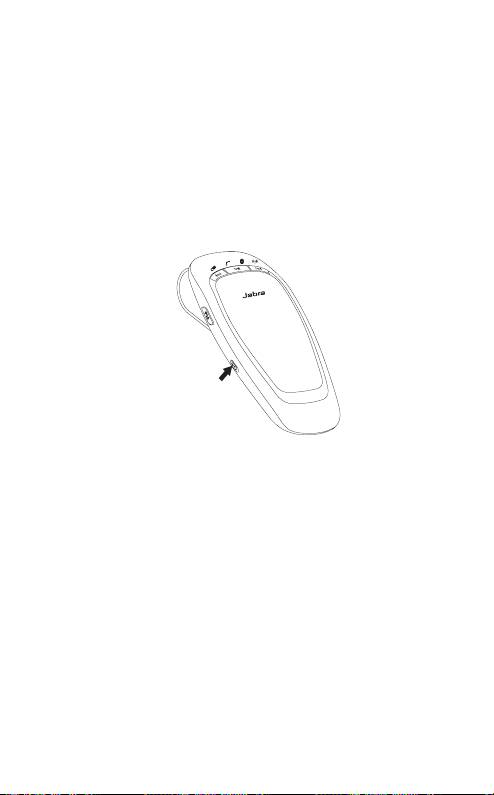
tÆnd/slUK for dIn speAKerphone
- Skub tænd/sluk-knappen for at tænde eller slukke for din
speakerphone
DVALETILSTAND
Din speakerphone slukker automatisk efter 10 minutter, hvis der
ikke er forbindelse til telefonen. Bank på Besvar/afslut-knappen
for at tænde for din speakerphone igen.
pArrIng Med dIn telefonen
Speakerphones sluttes til mobiltelefoner med en procedure, der
kaldes ’parring’. Ved at følge disse simple trin kan en telefon parres
med en speakerphone i løbet af et par minutter.
1 Sæt din speakerphone i parringstilstand
- Når du tænder for Jabra CRUISER den første gang,
vil din speakerphone automatisk starte i parringstilstand, dvs.
den kan registreres af din telefon. Når din speakerphone er
i parringstilstand, høres talemeddelelsen “Pairing mode”
(Parringstilstand) og ikonet for forbindelsesstatus blinker hurtigt.
JABRA CRUISER
5
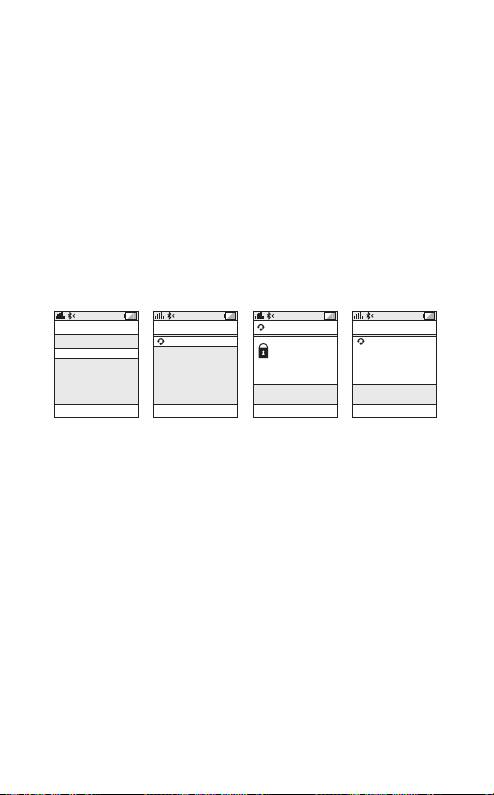
2
Indstil Bluetooth-telefonen, så den ”registrerer” Jabra CRUISER
- Følg brugervejledningen til din telefon. Du skal først sikre dig,
at Bluetooth er aktiveret på din mobiltelefon. Indstil derefter
din telefon til at søge efter din speakerphone. Du skal normalt
bruge en opsætnings-, tilslutnings- eller Bluetooth-menu på
telefonen og vælge en indstilling til at ‘registrere’ eller ‘tilføje’
en Bluetooth-enhed.*
EngElsk
3 Telefonen registrerer Jabra CRUISER
- Din telefon vil finde din speakerphone under navnet
“Jabra CRUISER”.
- Derefter vil din telefon spørge dig, om du vil parre med
din
speakerphone. Accepter ved at trykke ’Ja’ eller ’OK’ på telefonen,
og bekræft med adgangskoden eller PIN-koden = 0000 (fire nuller).
Telefonen bekræfter, når parringen er gennemført.
JABRA CRUISER
6
CONNECTIVITY
DEVICES FOUND
Jabra CRUISER
HANDSFREE
MobilSurf
Jabra CRUISER
Jabra CRUISER
BLUET O O T H
added.
Infrared port
Passkey:
The handsfree is
Wap options
****
now ready for use
Synchronization
Networks
SELECT
SELECT
OK
SELECT
Manuel parringstilstand
Hvis du vil bruge din speakerphone med en anden telefon,
eller hvis parringsprocessen blev afbrudt, kan du manuelt
indstille din speakerphone til parringstilstand.
Tænd for din speakerphone. Tryk på og hold Besvar/afslut-knappen
nede i ca. 5 sekunder, indtil meddelelsen “Pairing mode”
(Parringstilstand) høres. Gentag derefter trin 2 og 3 i ovenstående
parringsvejledning.
oprettelse Af forBIndelse tIl dIn telefon
Parring er kun nødvendig, første gang en speakerphone og en
telefon bruges sammen. Når din speakerphone og telefonen er
parret én gang, bliver de automatisk tilsluttet, når din speakerphone
er tændt, og Bluetooth er aktiveret på telefonen. Din speakerphone
kan bruges, når den er ’tilsluttet’ til telefonen. Hvis enhederne er
parret, men ikke umiddelbart opretter forbindelse, skal du banke
på Besvar/afslut-knappen.
* Afhænger af telefonen
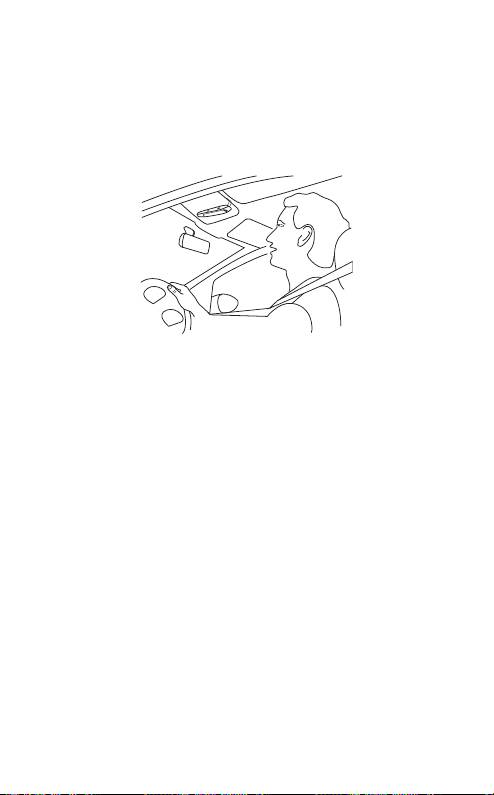
plACerIng Af dIn speAKerphone I dIn BIl
Jabra CRUISER placeres diskret og bekvemt på solskærmen
ved hjælp af en fastgøringsclips. For at opnå den optimale
lydkvalitet, skal du placere Jabra CRUISER lige foran dig,
og tale direkte i din speakerphone.
EngElsk
sÅdAn gØr dU
Besvar et opkald
- Bank let på Besvar/afslut-knappen på din speakerphone for at
besvare et opkald.
Afslut et opkald
- Bank let på Besvar/afslut-knappen på din speakerphone for at
afslutte et aktivt opkald.
Foretag et opkald
- Opkaldet overføres automatisk til din speakerphone*. Hvis det
ikke sker, skal du banke på Besvar/afslut-knappen.
Afvis et opkald*
- Tryk på Besvar/afslut-knappen.
Aktiver et stemmeopkald*
- Tryk på Besvar/afslut-knappen. Optag stemmekoden via din
speakerphone for at få det bedste resultat.
JABRA CRUISER
7
* Afhænger af telefonen

Ring til det sidst kaldte nummer*
- Dobbeltbank på Besvar/afslut-knappen, når din speakerphone
er tændt, men ikke i brug.
Slå mikrofonen fra/til
- Tryk på lydstyrke ned-knappen for at slå mikrofonen fra for et
aktivt opkald. Biptonen for lyd-slået-fra lyder hvert femte sekund.
- Bank på lydstyrke op/ned-knappen for at slå mikrofonen til igen.
EngElsk
Juster lyd og lydstyrke
- Bank på lydstyrke op/ned-knappen for at justere lydstyrken.
(i FM-tilstand kan du ikke justere lydstyrken via Jabra CRUISER –
brug istedet bilradioen).
Tredjeparts-opkald*
- Disse funktioner gør det muligt at parkere en samtale og
besvare et ventende opkald.
- Tryk på besvar/afslut-knappen én gang for at parkere det aktive
opkald og besvare det ventende.
- Tryk på besvar/afslut-knappen for at skifte mellem de to opkald.
- Tryk let på besvar/afslut-knappen for at afslutte den aktive samtale.
Overfør et opkald
- Hvis du vil overføre et opkald fra din speakerphone til
mobiltelefonen, skal du trykke og holde ned på Besvar/afslut-
knappen, indtil du hører en biptone.
- Hvis du vil overføre et opkald fra mobiltelefonen til din
speakerphone, skal du trykke og holde ned på Besvar/afslut-
knappen, indtil du hører en biptone.
Afspil musik eller sæt den på pause*
- Tryk på afspil/pause/stop-knappen for at afspille musik eller
sætte den på pause.
Stop musikken*
- Tryk på afspil/pause/stop-knappen.
Skift musiknummer*
- Bank på knappen for næste/forrige nummer.
Aktiver tilstanden natkørsel
- Tryk på FM-knappen og lydstyrke op-knappen samtidigt, mens
din speakerphone er tændt. Lyset slukkes. Du kan tænde lyset
igen ved at trykke en gang til. Din speakerphone tændes altid
med lyset tændt.
JABRA CRUISER
8
* Afhænger af telefonen

hVAd BetYder lYsIndIKAtorerne
Lysdiode Speakerphone-status
Ikonet for forbindelsesstatus
Parringstilstand
blinker hurtigt
Ikonet for forbindelsesstatus
Forbindelse oprettet
lyser konstant blåt
EngElsk
Ikonet for forbindelsesstatus
Standby/inaktiv
blinker hvert andet sekund
Ikonet for opkaldsstatus blinker
Indgående opkald
hvert sekund
Ikonet for opkaldsstatus lyser
Aktivt opkald
konstant blåt
Ikonet for FM-status lyser
FM-tilstand
konstant rødt
Ikonet for FM-status blinker
Scanning efter frekvens
hvert sekund
Ikon for opkaldsstatus og
Valg af sprog
forbindelsesstatus blinker
Ikon for batteristatus lyser (rødt) Lavt batteriniveau
eKstrA fUnKtIoner
BRUG AF DIN JABRA CRUISER MED TO MOBILENHEDER
Jabra CRUISER-din speakerphone kan have forbindelse til to
mobiltelefoner (eller andre Bluetooth-enheder) samtidigt. Dette
giver dig mulighed for at betjene begge dine mobiltelefoner
ved hjælp af kun én speakerphone. Bemærk, at funktionen Ring
til sidst kaldte nummer igen vil ringe til nummeret for det sidst
udgående opkald, uafhængigt af mobiltelefonen.
Bemærk, at hvis din speakerphone er forbundet til to telefoner,
vil Afspil/Pause/Stop og Næste/Forrige nummer blive sendt til
den telefon, der var den senest forbundne telefon (den senest
forbundne AVRC-prol).
JABRA CRUISER
9

AFSPIL MUSIK
Kontroller, at din speakerphone og mobiltelefonen er forbundne.
Når du afspiller musik fra din mobiltelefon, overføres den automatisk
til din speakerphone. Hvis telefonen ikke understøtter denne
funktion, skal du trykke på Besvar/afslut-knappen for at overføre
musikken til din speakerphone. Når du modtager et opkald, skifter
musikken automatisk til pausetilstand. Når opkaldet er afsluttet,
starter musikken igen. Fjernbetjen din musik via musikknapperne.
EngElsk
ÆNDRING AF SPROG FOR TALEMEDDELELSE
Talemeddelelser gør det nemmere og mere sikkert at bruge Jabra
CRUISER. Der er 5 understøttede sprog i følgende rækkefølge:
1 Engelsk
2 Spansk
3 Tysk
4 Fransk
5 Russisk
Ekstra sprog
Italiensk, portugisisk og kinesisk kan hentes via separat software,
der kan hentes på www.jabra.com.
Standardsproget er engelsk. Hvis du vil ændre sproget, skal du
følge disse trin:
- Skift til parringstilstand ved at trykke på og holde Besvar/
afslut-knappen nede, mens Jabra CRUISER er tændt, indtil
talemeddelelsen siger: “Pairing mode” (Parringstilstand).
- Tryk på FM-knappen, indtil det rigtige sprog høres.
- Bank på lydstyrke op- eller lydstyrke ned-knappen for at vælge
et nyt sprog.
- Vælg det foretrukne sprog, og tryk på FM-knappen, indtil det
nye sprog høres.
JABRA CRUISER
10